Managed vs Unmanaged Switches for Home Automation
Managed switches suit complex smart homes needing VLANs, traffic monitoring, and network control, while unmanaged switches suit smaller installations prioritizing simplicity, affordability, and straightforward wired connectivity.
Managed vs Unmanaged Switches
| Product | Managed Switch | Unmanaged Switch |
|---|---|---|
| Primary strength | Network control and segmentation | Simple wired connectivity |
| Performance | Supports traffic management and monitoring | Delivers standard switching performance |
| Maintenance | Requires configuration and occasional monitoring | Usually requires minimal attention |
| Durability | Depends on hardware quality and operating conditions | Depends on hardware quality and operating conditions |
| Price | Amazon | Amazon |
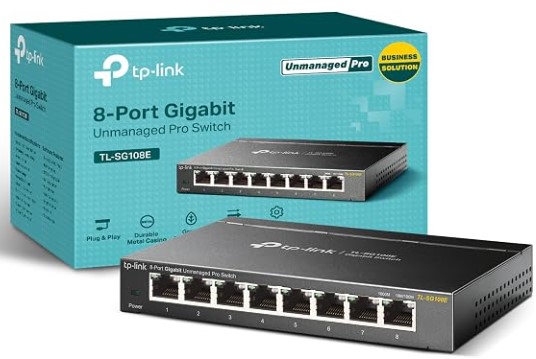
Managed Switch: TP-Link 8 Port Gigabit Switch (TL-SG108E)
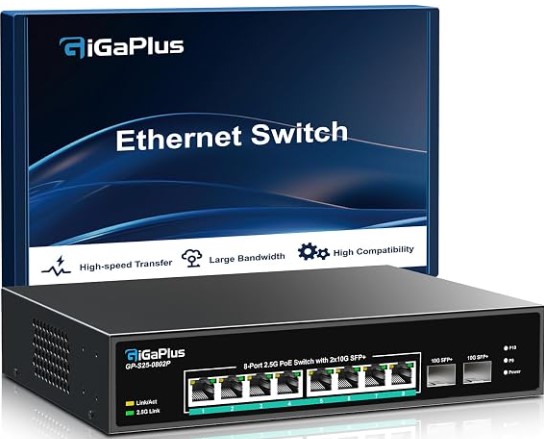
Unmanaged Switch: Unmanaged PoE Switch
The Fundamental Difference
The fundamental difference between managed and unmanaged switches is control over network traffic.
An unmanaged switch connects wired devices through an Ethernet network without requiring detailed configuration.
Connecting a router, smart home hub, network video recorder, and compatible wired access point usually requires little more than connecting the appropriate Ethernet cables and powering the equipment.
A managed switch provides administrative controls over how connected devices communicate. Depending on the model, features can include virtual local area networks (VLANs), Quality of Service (QoS), port monitoring, traffic statistics, access controls, and link aggregation.
VLANs allow compatible network equipment to separate devices into logical networks. For example, smart cameras and other Internet of Things (IoT) equipment can occupy a separate VLAN from personal computers. Proper configuration of routing and firewall rules helps restrict unwanted communication between networks.
However, a managed switch does not provide complete security by itself. The router, firewall, wireless access points, and connected devices must support the intended network design.
Testing Conditions
A fair comparison requires both switch types to operate in the same home network. A controlled assessment should use equivalent gigabit-capable switches, identical Ethernet cables, the same router, and the same connected devices.
A representative setup includes a home automation hub, a network camera, a wired access point, and a computer generating network traffic.
Testing should run for 24 hours under comparable conditions, including simultaneous camera streaming, hub communication, and file transfers. Throughput, latency, packet loss, connection interruptions, power consumption, and configuration time should be recorded using consistent tools.
Neither switch should receive an artificial advantage through different hardware specifications or network settings.
Testing note: The conditions above describe a reproducible comparison protocol, not a completed laboratory test. No measured results are claimed.
Performance Test
Performance
Managed: Provides visibility into network traffic and supports traffic-control features on compatible models. Proper configuration helps prioritize latency-sensitive traffic.
Unmanaged: Handles ordinary Ethernet switching efficiently without administrative setup. Most small smart homes do not need advanced traffic controls.
Speed
Managed: Can match an unmanaged switch when both have equivalent port speeds and switching capacity.
Unmanaged: Can deliver the same gigabit connection speeds under equivalent conditions. Management features alone do not guarantee faster transfers.
Noise
Managed: Some compact models operate silently, while higher-capacity or rack-mounted models may include fans.
Unmanaged: Many desktop models use fanless designs, making silent operation common.
Reliability
Managed: Offers diagnostic tools that help identify faulty links, unusual traffic, and certain network problems.
Unmanaged: Provides dependable connectivity with fewer configuration-related failure points. Troubleshooting may require additional equipment or manual testing.
Maintenance
Managed: May require firmware updates, configuration backups, monitoring, and occasional security reviews.
Unmanaged: Generally requires cable checks, basic cleaning, and replacement when hardware fails.
Installation
Managed: Requires additional planning when VLANs, port assignments, or traffic policies are necessary.
Unmanaged: Usually needs only appropriate cabling and power. Basic installation rarely requires networking expertise.
Where Managed Switches Win
Managed switches offer the strongest advantages when a smart home has multiple network zones, numerous connected devices, or demanding security requirements.
- Network segmentation: Separate compatible cameras, IoT devices, computers, and other equipment into logical networks.
- Traffic visibility: Inspect port statistics and identify abnormal usage or failing connections.
- Troubleshooting: Use available diagnostics to investigate link problems, errors, and network congestion.
- Traffic prioritization: Apply supported QoS settings when specific devices or traffic types require preferential treatment.
- Future expansion: Support more structured network management as additional wired devices and access points join the installation.
Managed switches make particular sense in larger homes with wired surveillance systems, multiple access points, local servers, and extensive automation equipment.
The important qualification is configuration. Incorrect VLAN assignments, trunk settings, or firewall rules can interrupt communication between smart home hubs, mobile applications, and connected devices.
Where Unmanaged Switches Win
Unmanaged switches are often the better purchase for straightforward residential networks.
- Lower purchase cost: Basic models generally cost less than comparable managed equipment.
- Simpler setup: No VLAN planning or administrative interface is necessary.
- Fewer configuration risks: Incorrect management settings cannot disrupt a network because advanced configuration is absent.
- Low maintenance: Most installations operate without routine administrative attention.
- Quiet operation: Many small desktop switches use fanless cooling.
A household connecting a smart television, automation hub, desktop computer, and wired access point may gain little practical value from advanced management features.
An unmanaged switch also makes sense when the router already provides adequate network segmentation and the switch only needs to extend wired connectivity.
The Hidden Cost
The purchase price represents only part of the ownership cost. Installation effort, electricity consumption, maintenance, and replacement also affect long-term value.
Managed switches can require extra setup time, compatible networking equipment, and occasional troubleshooting. Some models also consume more power because of additional hardware or features, although actual consumption varies by model.
Unmanaged switches usually cost less to configure and maintain. However, replacing an unmanaged switch with a managed model later can create additional expense if network segmentation becomes necessary.
Neither category automatically lasts longer. Operating temperature, ventilation, power quality, component quality, and installation conditions influence service life.
Before purchasing, check port count, gigabit support, PoE requirements, power budget, mounting options, warranty, and energy consumption.
Power over Ethernet (PoE) matters when cameras or access points receive electrical power through Ethernet cables. A standard switch without PoE cannot power compatible devices unless separate power supplies or injectors provide electricity.
Which One Fits Your Home?
Choose a Managed Switch When:
- Multiple VLANs are required for cameras, IoT equipment, and personal devices.
- Network monitoring and detailed troubleshooting matter.
- A larger installation includes several access points, wired cameras, or local servers.
- Supported QoS controls or advanced port features serve a defined purpose.
- Future network expansion justifies additional setup and maintenance.
Choose an Unmanaged Switch When:
- A small smart home needs additional Ethernet ports.
- The router already handles essential security and network management.
- Connected devices require standard wired connectivity rather than specialized controls.
- A straightforward installation matters more than detailed network visibility.
- The budget favors essential connectivity over advanced administration.
For households needing basic connectivity today but VLAN support later, a smart-managed switch can provide a useful middle ground. Feature sets vary, so confirm VLAN, PoE, and management capabilities before buying.
1-Year Ownership Comparison
The following table uses illustrative USD estimates for a small residential installation. The figures are planning allowances, not verified retail quotations or measured electricity costs. Actual prices vary by market, specifications, and installation requirements.
| Cost | Managed Switch | Unmanaged Switch |
|---|---|---|
| Purchase | $60–$150 | $20–$60 |
| Consumables | $0–$5 | $0–$5 |
| Maintenance | $0–$30 | $0–$10 |
| Accessories | $0–$20 | $0–$10 |
| Energy | $5–$20 | $3–$15 |
| Estimated first-year total | $65–$225 | $23–$100 |
Final Verdict
For complex smart homes, managed switches provide stronger control, monitoring, and network segmentation. For smaller installations, unmanaged switches offer reliable wired connectivity with less expense and effort. Match the switch to actual security, performance, and expansion requirements rather than assuming advanced features automatically improve a home network.
FAQs
1. Is a managed switch better for home automation?
A managed switch is better when home automation requires VLANs, traffic monitoring, or advanced network controls. An unmanaged switch remains suitable for ordinary wired connections involving a few smart home devices.
2. Do smart home devices need a managed switch?
Most smart home devices do not require a managed switch. Smart bulbs, hubs, televisions, and many cameras work through compatible wireless networks or ordinary Ethernet connections. Managed switching becomes useful when network segmentation or advanced troubleshooting is necessary.
3. Does a managed switch improve internet speed?
A managed switch does not automatically increase internet speed. Equivalent switches with suitable port speeds can deliver comparable throughput.
Managed features may improve traffic handling in specific congested networks, but internet speed also depends on the router, service connection, cabling, and connected devices.
To Wrap It Up
Managed switches suit smart homes requiring greater control, segmentation, and diagnostics. Unmanaged switches suit straightforward installations needing dependable Ethernet connectivity. Compare specifications, security requirements, installation costs, and future expansion plans before choosing residential network hardware.