Keypad vs Phone-Based Gate Access
Keypad access suits households prioritizing simple, dependable entry without smartphones, while phone-based access suits remote control and flexible permissions; connectivity and backup access determine the better fit.
Keypad vs Phone-Based Gate Access
| Comparison | Keypad access | Phone-based access |
|---|---|---|
| Primary strength | Simple code-based entry | Remote control and digital permissions |
| Performance | Fast local entry | Fast nearby or remote entry, depending on connectivity |
| Maintenance | Cleaning, weather protection, occasional code updates | App updates, network checks, battery and controller maintenance |
| Durability | Outdoor-rated keypads withstand routine exposure | Outdoor controller durability depends on enclosure and installation |
| Price | Amazon | Amazon |
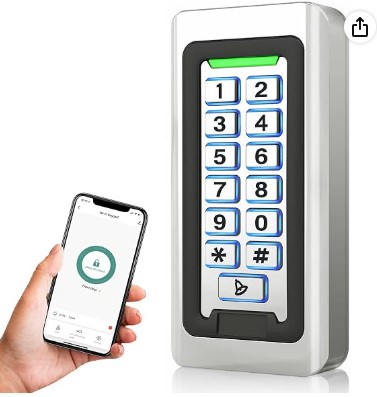
Keypad Gate Access: AMOCAM Wireless WiFi Access Control Keypad
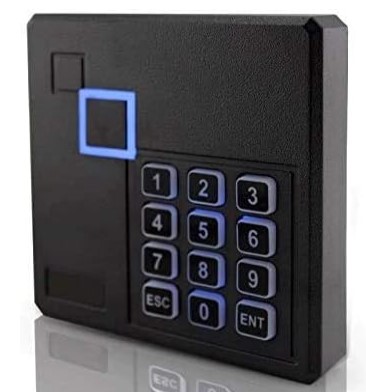
Phone-Based Gate Access
The Fundamental Difference
The fundamental difference lies in how each system authenticates entry and communicates with the gate controller.
Keypad access: Local authentication
A keypad sends an entered PIN to an access controller. The controller checks the code against authorized credentials and activates a compatible gate operator when access is approved.
Basic systems can operate locally without an internet connection.
Depending on the model, code storage and authorization may remain available during internet outages. Power failure can still interrupt operation unless backup power or an appropriate manual release is available.
Phone-based access: Digital authentication
A phone-based system uses a smartphone credential or app to request access. Bluetooth systems generally work within nearby range, while internet-connected systems can support remote commands through a networked controller or cloud service.
The architecture matters. Bluetooth access does not automatically provide remote control, and Wi-Fi access does not guarantee operation during an internet outage. Cellular-enabled controllers may provide another route, often with recurring data or service costs.
The practical distinction: A keypad relies on an entered code; phone-based access relies on a digital credential and the communication method supporting the request.
Testing Conditions
A fair comparison uses the same residential gate, compatible controller, gate operator, power supply, and access schedule. Both systems should complete repeated authorized entries, reject invalid credentials, and undergo checks during normal operation and simulated internet interruptions.
Entry time should be measured from credential submission to controller authorization, excluding the gate’s physical opening time. Reliability should include failed requests, delayed commands, and recovery after power restoration.
Maintenance checks should cover weather exposure, cleaning, software updates, and credential changes. The comparison below uses these practical evaluation criteria, not a claimed laboratory test or independently measured product trial.
Performance Test
Performance
- Keypad: Provides direct PIN-based entry, with performance depending on controller response and keypad quality.
- Phone-based: Supports digital authentication, with response affected by Bluetooth range, network quality, and app performance.
Speed
- Keypad: Entry requires entering a code, although longer PINs take additional time.
- Phone-based: An unlocked phone or configured digital credential may provide quicker entry. App loading or connection delays can reverse that advantage.
Noise
- Keypad: Silent during normal authentication, apart from optional confirmation tones.
- Phone-based: Usually silent, although phone notifications, keypad-free intercoms, or controller alerts may produce sound.
Neither method inherently makes the gate operator quieter. Motor noise depends on the gate mechanism, motor condition, and installation.
Reliability
- Keypad: Local systems can continue accepting authorized codes without internet access.
- Phone-based: Bluetooth systems can work offline nearby, while remote app access may fail during network, server, or connectivity disruptions.
Both methods depend on controller power and compatible hardware.
Maintenance
- Keypad: Requires occasional cleaning, code management, and inspection of buttons, seals, and wiring.
- Phone-based: Adds app compatibility, firmware updates, network troubleshooting, and potentially account or subscription management.
Installation
- Keypad: Usually requires mounting, controller integration, suitable wiring, and configuration.
- Phone-based: May require a compatible smart controller, network coverage, app configuration, and additional networking hardware.
Installation complexity depends more on existing gate infrastructure than on the access method alone.
Where Keypad Access Wins
A keypad has the advantage when predictable local entry matters more than remote convenience.
- Households with mixed technology preferences: Children, older relatives, and visitors can enter with an authorized code without carrying a compatible smartphone.
- Properties with unreliable internet: A suitable standalone keypad can continue working during internet outages.
- Rental properties and frequent visitors: Separate PINs or temporary codes, where supported, simplify access changes.
- Budget-conscious installations: Basic keypads often cost less than network-connected access systems.
The strongest choice is an outdoor-rated keypad with protected wiring, individual codes where available, and a controller supporting straightforward credential management.
Where Phone-Based Access Wins
Phone-based access becomes more useful when household members need flexible control beyond the gate entrance.
- Remote visitor access: Internet-connected systems can authorize entry for guests or service providers while residents are away.
- Changing permissions: Supported apps can revoke digital credentials without requiring a physical keypad replacement.
- Access monitoring: Compatible systems may record entry events, display access history, or send notifications.
- Integrated security: Certain controllers work with video intercoms, cameras, smart locks, and home automation platforms.
These benefits depend on specific features, subscriptions, and compatibility. Remote unlocking should also use strong account authentication and carefully controlled permissions.
The Hidden Cost
The purchase price rarely represents the entire cost of residential gate access.
Keypad installations may require an outdoor enclosure, cabling, mounting hardware, a controller interface, and backup power. Replacement costs can increase when proprietary keypads or discontinued controllers restrict compatibility.
Phone-based systems may add a smart controller, network equipment, cellular data, cloud subscriptions, smartphone replacement considerations, and occasional technical support. Some apps provide remote access without a subscription, while others restrict important features to paid plans.
Both systems may need surge protection, weatherproof connections, and backup batteries. Electric gate operators also consume power independently of the access method.
Time matters, too. Forgotten PINs create code-management work; phone-based systems can require troubleshooting after app, network, or account changes. A hybrid installation can reduce dependence on either method, although the additional hardware increases upfront cost.
Which One Fits Your Home?
The right system should match daily household routines, visitor frequency, and local infrastructure.
Choose keypad access when:
- Household members need entry without smartphones or mobile apps.
- Internet service is unreliable or unavailable at the gate.
- Initial installation cost and simple maintenance are priorities.
- Regular visitors need controlled access through individual or shared PINs.
Choose phone-based access when:
- Remote gate opening is a regular household requirement.
- Residents frequently authorize deliveries, contractors, or visiting guests.
- Digital access permissions and entry notifications offer practical value.
- Reliable connectivity, compatible smartphones, and secure account management are available.
Consider a hybrid system when convenience and dependable backup matter equally. A compatible keypad and phone-enabled controller can provide two access methods, provided the system supports both and includes appropriate power backup.
1-Year Ownership Comparison
First-year costs depend on gate type, local labor rates, controller compatibility, and available products. The table below compares typical cost categories rather than presenting unsupported market prices.
| Cost | Keypad access | Phone-based access |
|---|---|---|
| Purchase | Usually lower | Usually moderate to higher |
| Consumables | Usually minimal | Usually minimal; cellular data may apply |
| Maintenance | Cleaning, inspection, occasional repairs | Updates, connectivity checks, possible technical support |
| Accessories | Mounting hardware, wiring, backup power | Smart controller, networking equipment, backup power |
| Energy | Controller standby consumption | Controller standby consumption; networking may add consumption |
| Estimated first-year total | Generally lower for basic installations | Often higher when connectivity or subscriptions are required |
Final Verdict
For households prioritizing straightforward entry, lower initial costs, and reduced dependence on connectivity, keypad access offers a practical fit.
For households needing remote unlocking, flexible digital permissions, and access notifications, phone-based access offers greater convenience. Reliable backup access and compatible gate hardware should guide the final purchase decision.
FAQs
1. Is keypad gate access more secure than phone-based access?
Neither method is automatically more secure. Keypads can suffer from shared, guessed, or poorly managed PINs.
Phone-based systems can face compromised accounts, weak authentication, or unauthorized digital access. Strong PIN policies, individual credentials, secure app accounts, and regular permission reviews improve security.
2. Can a phone-based gate access system work without internet?
Yes, depending on the technology. Bluetooth systems can often authorize nearby entry without internet access. Some controllers also retain locally stored credentials or support local network operation.
Remote app access generally requires a working communication path. Confirm offline behavior with the manufacturer before purchasing.
3. Can a keypad and phone-based gate access system work together?
Yes. Compatible access controllers can support both keypad entry and smartphone credentials. A hybrid setup allows everyday PIN access alongside remote unlocking. Confirm controller compatibility, supported credential types, weather protection, and backup power requirements before installation.
To Wrap It Up
Keypad access delivers straightforward, economical entry, while phone-based access adds remote control and flexible permissions. Compare connectivity, security, installation costs, and backup options before selecting residential gate access hardware that suits everyday household needs.