Best Network Switches for Smart Homes
The best smart home network switches combine Gigabit speeds, adequate port counts, and reliable PoE power. Managed controls, fanless cooling, and VLAN support improve reliability, security, and everyday operation.
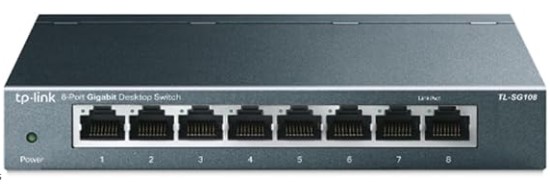
The Winner: TP-Link 8 Port (TL-SG108)
Top 3 Quick Comparison Table
| Product | 3 Key Attributes | Important Metric | Price |
|---|---|---|---|
| TP-Link TL-SG108 | 8 ports, Gigabit, fanless | 8 × 1 Gbps | Amazon |
| TP-Link TL-SG108PE | 8 ports, PoE+, managed features | 64 W PoE budget | Amazon |
| NETGEAR GS308EP | 8 ports, PoE+, smart management | 62 W PoE budget | Amazon |
What Problem Is Being Solved?
Smart TVs, cameras, Wi-Fi access points, hubs, and computers compete for dependable network connections. Wi-Fi congestion, weak coverage, and insufficient router ports can cause buffering, dropped camera feeds, and unreliable automation.
A suitable Ethernet switch adds wired connections, reduces wireless dependence, and supplies power to compatible devices when PoE is available.
What Matters Most When Buying a Network Switch?
- Port count: Eight ports suit smaller homes; 16 or 24 ports accommodate larger installations.
- Speed: Gigabit Ethernet handles most residential devices. Multigigabit ports benefit faster access points and network storage.
- PoE budget: Check total wattage and per-port limits for cameras and access points.
- Management: VLANs, traffic monitoring, and configuration options support advanced networks.
- Cooling and reliability: Fanless designs reduce noise; adequate ventilation helps prevent overheating.
How We Evaluated the Products
This guide compares published specifications, intended residential uses, power budgets, and management capabilities. No physical laboratory testing or independent cycle testing was performed for this article.
A proper hands-on test would connect cameras, access points, smart hubs, and computers, then measure throughput, power consumption, temperature, packet loss, and noise under sustained household traffic.
Best Network Switches for Smart Homes
1. TP-Link TL-SG108
(Best for Everyday Smart Home Connections)
Performance
Eight Gigabit ports support wired connections for smart TVs, desktop computers, hubs, and gaming consoles. The fanless design keeps operation quiet.
What worked
Plug-and-play setup, a metal enclosure, wall-mounting support, and low power consumption make the TL-SG108 a practical everyday choice.
What failed
No PoE power delivery, VLAN configuration, or advanced managed controls. Cameras and access points requiring Ethernet power need separate injectors or power supplies.
Maintenance
Keep ventilation openings clear, inspect Ethernet cables, and use a stable power outlet.
Best household situation
Small and medium homes needing dependable wired connectivity without complicated configuration.
Poor fit
Homes requiring powered IP cameras, dedicated network segmentation, or multigigabit connections.
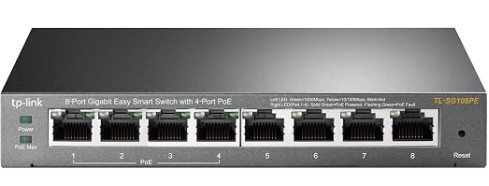
2. TP-Link TL-SG108PE
(Best for Smart Cameras and Access Points)
Performance
Eight Gigabit ports include four PoE+ ports. Certain hardware versions specify a 64 W power budget, while other revisions may differ.
What worked
VLAN support, traffic prioritization, port monitoring, and PoE delivery help organize connected devices. Compatible cameras and access points can receive power and data through one Ethernet cable.
What failed
Only four ports provide PoE. Advanced network management remains more limited than on fully managed switches.
Maintenance
Check firmware, review connected-device power requirements, and leave sufficient ventilation around the enclosure.
Best household situation
Homes with several PoE cameras, a wireless access point, or basic network-segmentation requirements.
Poor fit
Installations needing PoE on every port or advanced enterprise-level management.
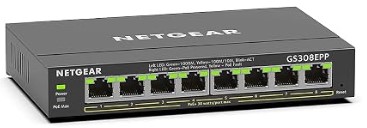
3. NETGEAR GS308EP
(Best for Multiple PoE Devices)
Performance
Eight Gigabit ports support PoE+, with a published total power budget of 62 W. All eight ports support PoE+.
What worked
Smart management features, PoE prioritization, port-level power limits, and fanless operation suit installations with several cameras and access points.
What failed
The 62 W shared budget limits simultaneous device power. High-demand equipment may require a larger switch, even when spare ports remain available.
Maintenance
Monitor the total PoE load, install firmware updates, and keep the switch away from heat-producing equipment.
Best household situation
Homes with multiple Ethernet-powered cameras, access points, and other compatible network equipment.
Poor fit
Small networks with no PoE requirements or installations needing multigigabit throughput.
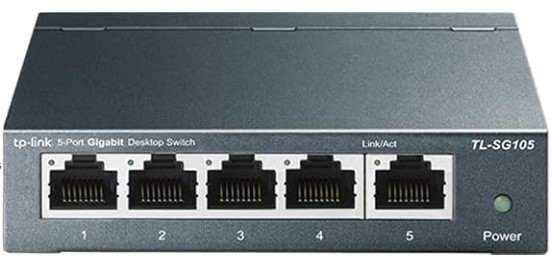
4. TP-Link TL-SG105PE
(Best for Compact Installations)
Performance
Five Gigabit ports include four PoE+ ports and a published 65 W power budget.
What worked
A compact, fanless enclosure, VLAN support, traffic monitoring, and PoE auto-recovery provide useful controls in a small footprint.
What failed
Five total ports leave little room for future expansion. Four powered devices leave only one port for an additional non-PoE connection.
Maintenance
Keep the enclosure ventilated and periodically check power consumption and cable condition.
Best household situation
Small apartments, compact network cabinets, and dedicated camera installations.
Poor fit
Large households with numerous wired devices or extensive expansion plans.
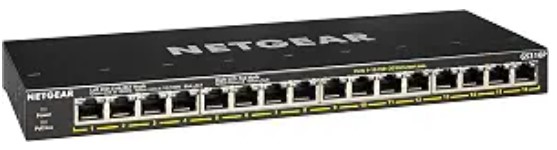
5. NETGEAR GS316
(Best for Larger Homes and Renovations)
Performance
Sixteen Gigabit ports provide more connection capacity for wall outlets, televisions, computers, access points, and network storage.
What worked
Plug-and-play installation, fanless cooling, wall mounting, and energy-efficient Ethernet make the GS316 practical for a central wiring point.
What failed
No PoE power delivery or managed VLAN controls. Powered cameras require compatible injectors or a separate PoE switch.
Maintenance
Label Ethernet cables, maintain ventilation, and inspect connections when troubleshooting network interruptions.
Best household situation
Renovations, larger homes with structured Ethernet wiring, and households expecting more connected devices.
Poor fit
Installations requiring PoE, advanced security segmentation, or multigigabit links.
The Test Results
The table below compares published specifications, not measured laboratory performance.
| Metric | TL-SG108 | TL-SG108PE | GS308EP |
|---|---|---|---|
| Total ports | 8 | 8 | 8 |
| Gigabit ports | 8 | 8 | 8 |
| PoE+ ports | 0 | 4 | 8 |
| Total PoE budget | None | 64 W* | 62 W |
| Fanless design | Yes | Yes | Yes |
| Managed features | No | Yes | Yes |
Long-Term Ownership
Network switches generally need little routine maintenance. Keep dust away from ventilation areas, replace damaged cables, and install supported firmware updates on managed models. PoE switches consume additional electricity when powering devices. Poor ventilation, overloaded power budgets, and unreliable power supplies can undermine long-term stability.
Who Should Buy Each Option?
Best for heavy household use
NETGEAR GS308EP: Eight PoE+ ports accommodate several compatible cameras and access points.
Best for limited space
TP-Link TL-SG105PE: Compact dimensions suit smaller installations.
Best for low maintenance
TP-Link TL-SG108: Simple, fanless operation avoids unnecessary configuration.
Best for a renovation
NETGEAR GS316: Sixteen ports support a larger structured Ethernet installation.
What Not to Pay For
Avoid paying extra for PoE when every connected device already has its own power supply. Multigigabit speeds offer limited value when the router, internet service, and connected devices operate at Gigabit speeds. Advanced VLAN features also add little value unless network separation or traffic control is actually required.
The Buying Verdict
Choose the TP-Link TL-SG108 for straightforward wired connectivity, the TL-SG108PE for a modest PoE installation, or the NETGEAR GS308EP for more PoE-powered devices. Larger homes benefit from sixteen ports. Check speed compatibility, power budgets, management requirements, and hardware revisions before ordering.
FAQs
1. What size network switch does a smart home need?
Eight ports suit smaller homes with several wired devices. Sixteen ports provide more room for cameras, televisions, computers, access points, and future additions. Count the uplink connection and allow spare ports for expansion.
2. Is a managed or unmanaged switch better for a smart home?
Unmanaged switches suit straightforward connections and require little setup. Managed switches offer VLANs, monitoring, and traffic controls for more complex networks. VLAN configuration can improve separation, but correct router and access-point configuration remains important.
3. Does a smart home network switch improve Wi-Fi speed?
A switch does not directly increase wireless speed or internet bandwidth. A wired connection can reduce Wi-Fi congestion and provide reliable backhaul for compatible access points. Internet performance still depends on the router, service plan, cabling, and connected equipment.
To Wrap It Up
A reliable smart home network starts with sufficient Ethernet ports, compatible Gigabit speeds, and dependable power delivery. Match PoE capacity to actual device requirements, select managed controls when network separation matters, and plan for future connections. The right switch improves everyday reliability without adding unnecessary complexity or ownership costs.